 Hello and welcome!
The SIMNA Member Directory is a member-only tool (think LinkedIn for impact measurement) that enables you to connect with others in and across the network.
With an advanced search function and the option to reach out to other SIMNA members over email, it’s got great potential!
Follow the four steps below to join. If you can’t remember your password or don’t have one, let me know at laura@simna.com.au.
Step 1: Review the Member Directory
- Log on to the SIMNA Members Area (also accessible from the SIMNA website)
- Click on the Directory tab
- You’ll see a few people listed:
- Click on any of these profiles to see what fields are shown in the directory
- I have enabled ‘send message’ on my profile – this is optional.
Step 2: Update your profile
- Click on View Profile in the top right corner of the screen
- Scroll down to see the full list of fields available (areas marked ‘private’ are not made public)
- To update your profile:
- Click on Edit Profile
- Fill in the form and click Save
Step 3: Add your profile to the Directory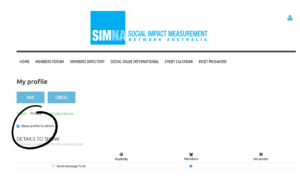
- Click on the (2nd) privacy tab
- Click on Edit Profile
- Select ‘Show Profile to Others’
- Decide whether you want to allow access to ‘Send message form’
- Click Save
Step 4: Review how you appear in the Directory
- You should appear!
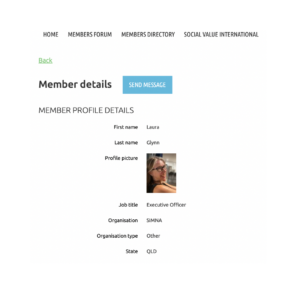
- Have a look at what is shared on your profile
- Try an advanced search of the Directory
Now that you know a bit more about me, I look forward to finding our a bit more about you.
Laura Glynn | Executive Officer